
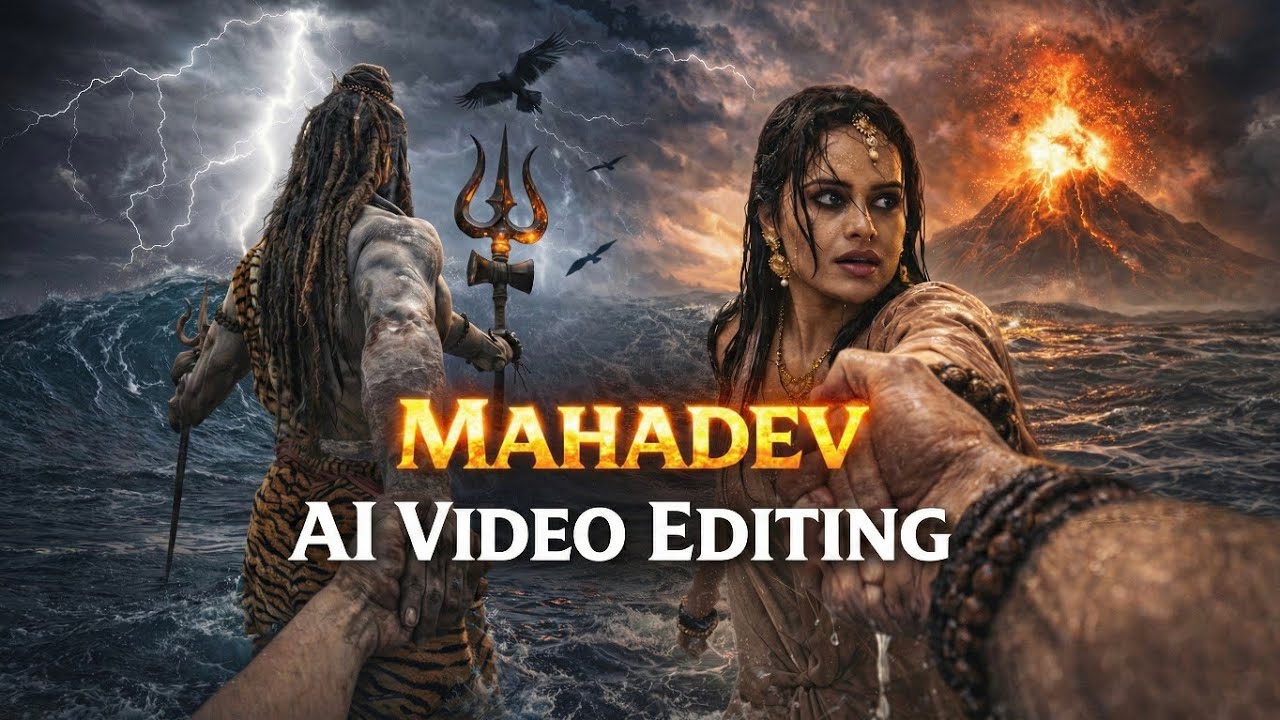
The Mahadev Hand AI Video Editing trend is a powerful, spiritually themed movement taking social media by storm in 2026. This editing style uses Artificial Intelligence to create a surreal, cinematic experience where the user appears to be walking alongside or holding the hand of Lord Shiva (Mahadev).
Mahadev Hand AI Video Editing
This editing style utilizes AI Generative tools (like Bing Image Creator or Midjourney) combined with Video Motion AI (like Luma Dream Machine, Runway Gen-2, or Kling AI) to create a seamless, high-definition video. The typical scene features a person from a first-person POV (Point of View) or a back-shot, where their hand is being held by a divine, giant, or ethereal figure of Lord Shiva amidst a dramatic background like the Himalayas, a stormy ocean, or a glowing cosmic temple.
How to Use?
Since this isn’t a “one-click” filter, it involves a 3-step AI process:
Generate the Image: Use an AI prompt in Bing Image Creator to get the base photo.
Prompt Example: “A 3D realistic cinematic shot from a back POV of a young man walking and holding the hand of a giant, glowing Lord Shiva. Background is a dark stormy ocean with lightning. 4K high detail.”
Animate the Image: Upload that image to an AI Video generator like Luma AI or Kling AI. Use a motion prompt like “The characters walk forward through water, cinematic slow motion, water splashing, epic lightning in the background.”
Final Polish (CapCut): Import the generated video into CapCut. Add trending Mahadev music (like “Har Har Shambhu” or “Kaal Ke Kapal”), apply a “Vignette” or “Retro” filter, and add a slow-zoom effect for a cinematic feel.
How To Create Your First AI Image?
To get that viral, cinematic look, you first need a high-quality base image that blends reality with the divine. You’ll want to describe a scene where a character (representing you) is captured from a back-angle or a “follow-me” perspective, walking toward a majestic, larger-than-life representation of Lord Shiva. The AI works best when you specify the clothing, the atmosphere—like the snowy peaks of Kedarnath or a mystical stormy sky—and the glowing details of Mahadev’s form. By adding your name to the character’s clothing in the prompt, the AI personalizes the image specifically for your social media profile, making it look like a custom-made digital masterpiece rather than a generic filter.
Once the AI generates the four options, look for the one with the most realistic “hand-holding” connection, as this will make the eventual video animation look much smoother.
A cinematic mythological scene from a first-person POV, Lord Shiva standing in a raging ocean during a cosmic storm, Shiva holding the viewer’s hand and pulling them forward, viewer’s hand like modern human hand eith no wearings and slim hand, lord shiva’s powerful muscular arm in focus, wet skin texture with detailed veins, ash-smeared body, long matted hair flowing in the wind, trident (Trishul) holding in his another hand, crescent moon in his hair, tiger-skin cloth around waist, and he is only visible from back side. Massive waves crashing around, dark storm clouds, lightning striking the sky, glowing volcanic mountain erupting in the background, dramatic orange and purple sky, epic scale, divine aura, godly presence.
Ultra-realistic, cinematic lighting, shallow depth of field, motion blur on water, high contrast, volumetric fog, hyper-detailed skin and environment, image in 9:16 ratio, 8K, photorealistic, movie still, epic fantasy realism.
Wanna Create AI Video – Here is the Video Prompt
Create a single continuous cinematic shot using the two uploaded images as the start and end reference. The video begins in a first-person POV. The camera shows only the front person’s shoulder, arm, and hand holding the viewer’s hand. The camera moves forward naturally, as if the viewer is walking through ocean waves. Water splashes, rain falls, lightning flashes, and a volcano erupts in the background. Without any cuts or scene changes, the camera smoothly moves around the subject in one fluid motion, maintaining the hand-holding connection. The movement feels like a natural body-mounted camera (steady but realistic). As the camera completes the movement, it ends facing me, fully revealing my face and body while I continue walking forward through the water, still holding the viewer’s hand. Technical Style: Single take, one-shot camera, no cuts, no jumps, smooth cinematic motion, realistic physics, slow motion water splashes, dramatic lighting, ultra-realistic textures, epic storm atmosphere, 4K cinematic quality, natural human movement, stable focus, no flicker.
Tips to Get Free Credit?
Ran out of credits? Don’t worry—there is a simple way to keep creating without a subscription. If you aren’t ready to commit to a paid plan, follow these steps to get back to work:
The New User Bonus: Each new email login grants you 160 free credits. Since each video costs 20 credits, you can generate up to 8 videos per account.
The Multi-Account Workaround: If your current balance is zero, simply log in using a different email address to refresh your credits instantly.
Expect the Unexpected: Keep in mind that AI generation isn’t perfect. You might encounter occasional errors or results that don’t quite hit the mark. Be prepared to use a few extra credits to “regenerate” until you get the perfect shot.